Webull Thailand API Setup (US Stocks)
Connect KhunQuant to your Webull Thailand account to track your US equities/ETF portfolio, view single-leg options, and execute trades.
Webull is not one global broker — it operates completely separate regional entities (Webull Thailand, Webull US, Webull HK, Webull SG, etc.), each with its own signup portal, host, and API credentials. Credentials from one region will not work against another region's host. If you applied for OpenAPI access through the Thai Webull app/site, you are on Webull Thailand — set region: "th" in your config as shown below, or KhunQuant will try to reach the wrong regional host and every request will fail with an authentication error.
Step 1: Apply for Webull OpenAPI
Before generating API keys, you need to apply for OpenAPI access with Webull.
-
Log in to your Webull account and navigate to the API portal.
-
Read and accept the API Agreement and Risk Disclosure (ข้อตกลงการใช้งาน Webull API และการเปิดเผยความเสี่ยง).
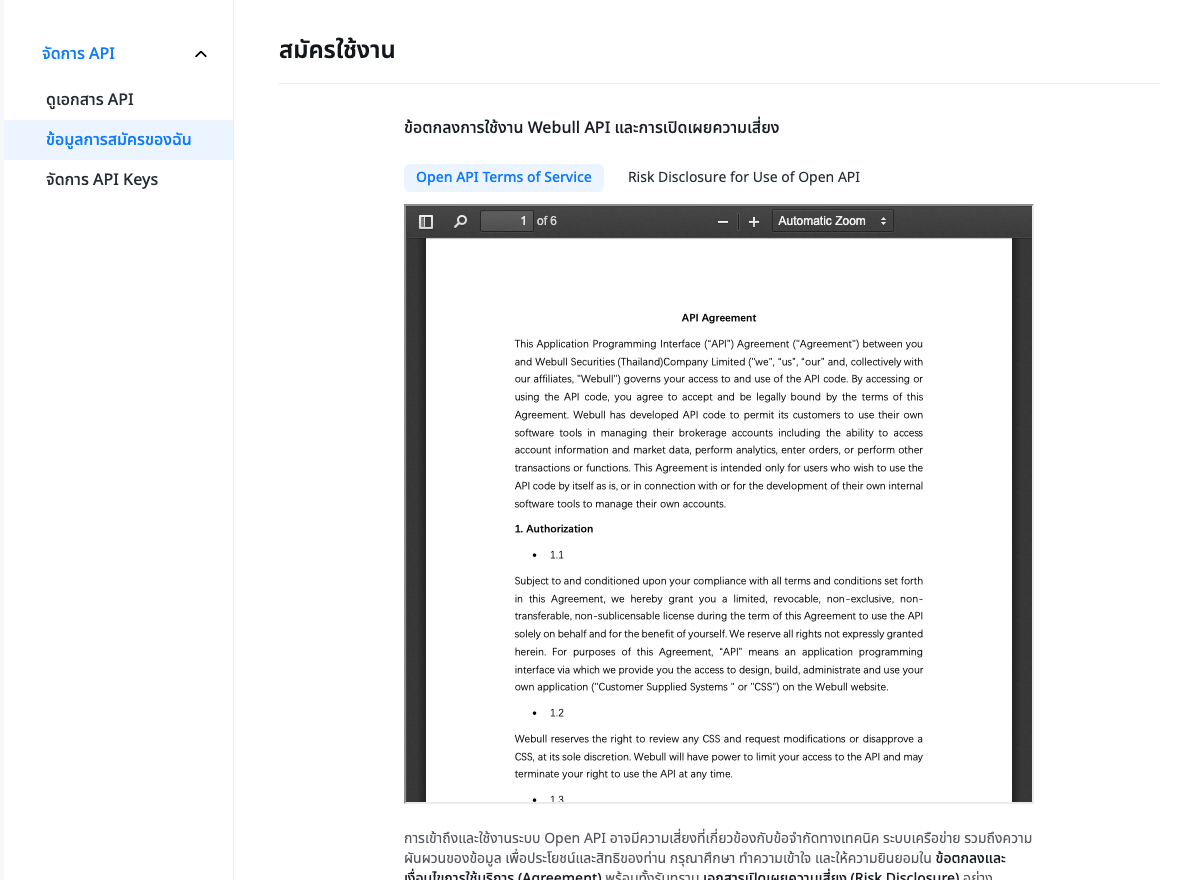
-
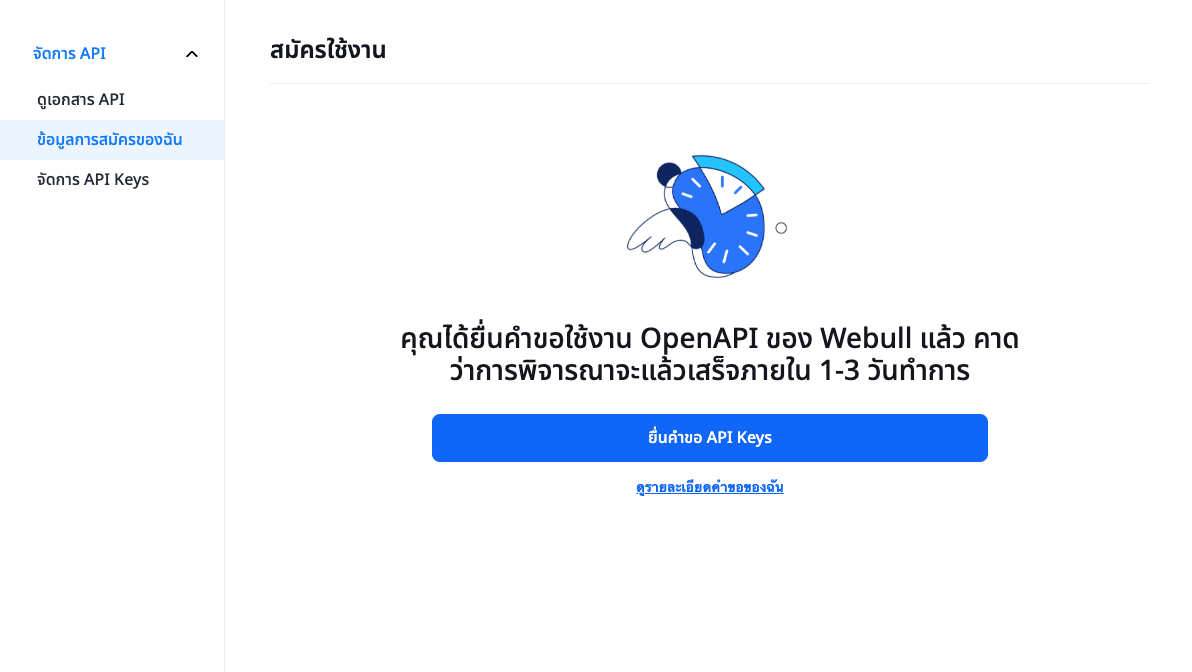
Submit your application. The review process typically takes 1-3 business days. You can track your application status under จัดการ API (Manage API) -> ข้อมูลการสมัครของฉัน (My Application Data).
Step 2: Generate API Keys
- Once your application is approved, return to the ข้อมูลการสมัครของฉัน page.
- Click on ยื่นคำขอ API Keys (Apply for API Keys) to generate your credentials.
- Securely store your App Key and App Secret. You will need them for KhunQuant.
You do not need to look up your Webull Account ID before configuring KhunQuant. If you leave account_id blank, KhunQuant automatically discovers it on first use from your App Key/App Secret. It will only ask you to pick one manually if your Webull account has more than one sub-account.
Step 3: Configure KhunQuant
In your config.yaml, add the Webull configuration using the credentials you obtained. region: "th" is required for Webull Thailand accounts — it tells KhunQuant which regional host to talk to.
exchanges:
  webull:
    enabled: true
    accounts:
      - name: "my_webull"
        region: "th"
        api_key: "YOUR_APP_KEY"
        secret: "YOUR_APP_SECRET"
        # account_id: "YOUR_ACCOUNT_ID"  # optional — auto-resolved if omitted
If you prefer using .env, you can export:
KHUNQUANT_EXCHANGES_WEBULL_ENABLED=true
KHUNQUANT_EXCHANGES_WEBULL_ACCOUNTS_0_REGION=th
KHUNQUANT_EXCHANGES_WEBULL_ACCOUNTS_0_API_KEY=YOUR_APP_KEY
KHUNQUANT_EXCHANGES_WEBULL_ACCOUNTS_0_SECRET=YOUR_APP_SECRET
Re-authentication (Periodic In-App Approval)
Webull requires periodic re-approval of your API session directly from the Webull mobile app — this is a Webull platform requirement, not something KhunQuant can skip. There is no SMS code or OTP to type anywhere; approval only happens by opening the Webull app and tapping Approve.
When a session needs renewal, KhunQuant handles it automatically:
- KhunQuant detects the session needs re-authentication and starts a new login on your behalf.
- It tells you to open the Webull app and approve the pending login request.
- It polls in the background (up to 5 minutes) and sends you a follow-up message once you've approved — then automatically retries whatever you originally asked for.
You don't need to do anything except approve the request in the app when prompted. If you don't see a prompt in the app within a few minutes, close and reopen the app, or ask KhunQuant to try again.
Connecting from the web UI
You don't have to use chat to approve a login — the account settings page at http://localhost:18800/portfolios/webull has the same Connect button. Click it, approve in the Webull app, and the status badge updates to "Connected — expires in N days" once approved.
Both surfaces — chat and the web UI — share the exact same approved session, so it doesn't matter which one you use: approving from either place satisfies both, and the session survives KhunQuant restarts for its real ~15-day lifetime instead of resetting every time the gateway restarts.
Troubleshooting
| Problem | Solution |
|---|---|
| Every request fails with an authentication error, even with correct credentials | Confirm region is set correctly ("th" for Webull Thailand). Credentials only work against their own region's host — a Thailand-issued App Key will not authenticate against the US or any other region. |
| "Needs re-authentication" / KhunQuant asks you to approve in the app | Expected periodic behavior — open the Webull app and tap Approve. KhunQuant will detect it and retry automatically. |
| No SMS/code prompt appears in chat | This is correct — Webull has no API for SMS/OTP code entry. Approval is always done by tapping Approve inside the Webull app itself, never by typing a code. |
More than one Webull sub-account and unsure which account_id to use | Leave account_id blank — KhunQuant will list all sub-accounts and ask you to pick one the first time it needs to resolve it. |